Why setting up overkill architecture for this website ?
Its because I don't know k8s and jenkins. HAHAH, and I wanna get into the devops world. Sometime doing CI/CD stuff is way more interesting than making an application.
Architecture of my Home CI/CD pipeline
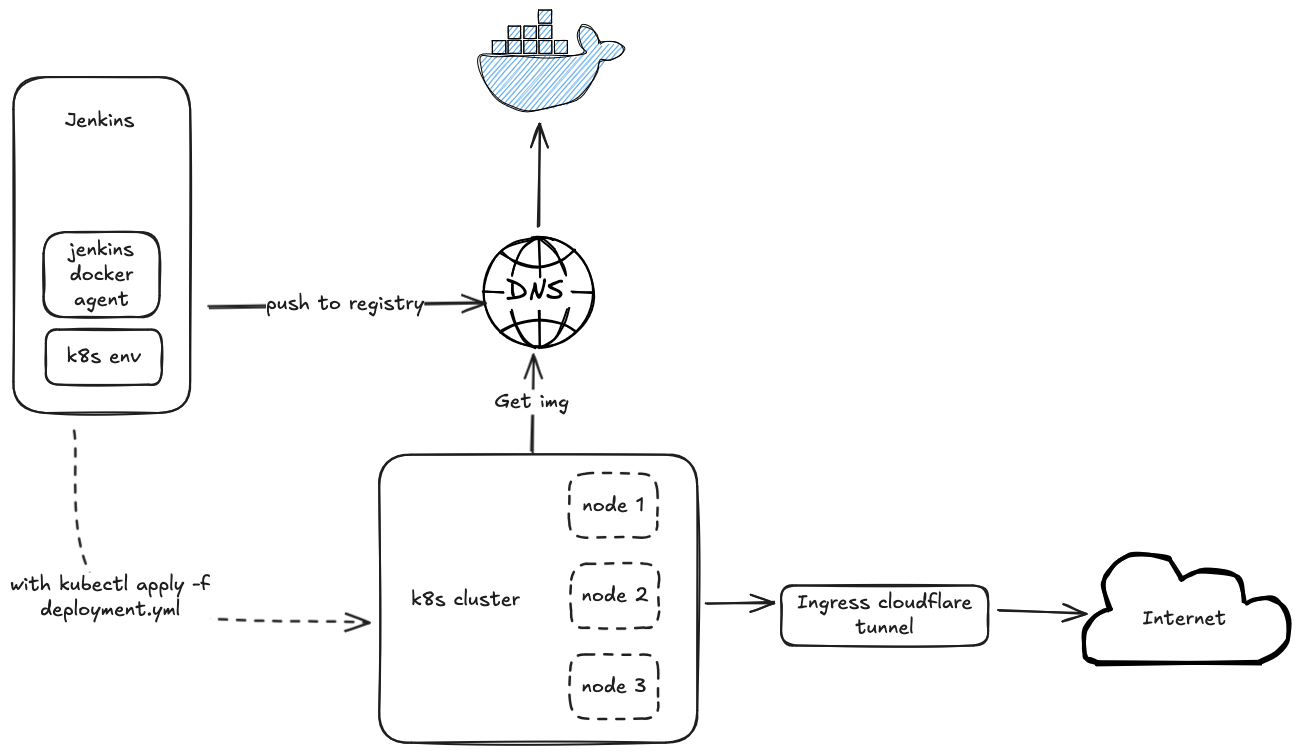
Prerequisites
- A physical machine with at least 16GB of RAM and 100GB of storage
- A domain name
VM and Machine Setup
I use Proxmox VE to manage my physical machine, as it is tailor-made for managing VMs and is free to use. Then, I create a VM with at least 4GB of RAM for Jenkins and install kubectl, as I will pass the kubeconfig to the Jenkins agent. I also create an 8GB VM for the k8s node and a 4GB VM for the Docker registry.
Jenkins Setup
I use docker compose to run jenkins in a dedicated VM cuz its easier to manage and won't pollute the env of this vm. Here is my setup:
services:
  jenkins:
    image: jenkins/jenkins:lts-jdk17
    privileged: true
    user: root
    restart: always
    ports:
      - "8080:8080"
      - "50000:5000"
    container_name: jenkins
    volumes:
      - /usr/bin/docker:/usr/bin/docker
      - ~/jenkins_home:/var/jenkins_home
      - /var/run/docker.sock:/var/run/docker.sock
      - /usr/local/bin/kubectl:/usr/local/bin/kubectl:ro
We mount the /var/run/docker.sock into the Jenkins container to allow the Jenkins agent to spin up containers for validating commits or building applications.
To set up Kubernetes access in the Jenkins VM, I followed this article: How to direct access to Kubernetes in Jenkins VM.
The basic steps are:
- Install kubectl in the VM
- Save the kubeconfig file in Jenkins using the credentials system
For instructions on saving credentials in Jenkins, refer to: Jenkins Credentials.
Configurating Jenkinsfile and k8s yaml
We can configurate jenkinsfile in 2 ways
- the web ui
- inside repo
I selected method 2 as its easier to manage and centralize the CI/CD configuration and source code
Here is what jenkins files looks like
pipeline {
  agent any
  stages {
    stage('Build') {
      steps {
        echo 'Hello, World!'
      }
    }
  }
}
About The Build Artifact
You might think setting up a docker registry is sample as its just like the following:
services:
  registry:
    image: registry:2
    ports:
      - "5000:5000"
    volumes:
      - registry_data:/var/lib/registry
So here's the thing - it's actually not as straightforward as it looks. k8s straight up refuses to work with image registries that are not using HTTPS. I spent like, a good few days banging my head against this problem. The issue is you've gotta go and configure every single MicroK8s machine to accept these insecure registries, which is a real pain. At some point I was chatting with Perplexity AI about this whole mess, So I took that advice and ended up setting up pihole to handle DNS resolution and nginx manager to take care of the DNS-01 challenge part.
K8s Deployment
So previously I said the jenkins also need to setup k8s env. Its because I would trigger the deploy stage for each merge in order to deploy the latest snapshot to my k8s cluster. Here is what the deploy stage looks like
  stage('Deploy') {
    steps {
      withCredentials([file(credentialsId: KUBECONFIG, variable: 'K8S_FILE')]) {
        sh """
          export KUBECONFIG=${K8S_FILE}
          kubectl apply -f deployment.yml
        """
      }
    }
  }
Setting up the k8s node and cloudflare tunnel ingress controller
I followed this article to set up Setup Homelab Kubernetes Cluster. However, I chose to use MicroK8s instead of the official k8s distribution because the it is a memory-hungry monster ahh. As u can see in the architecture diagram, the cloudflare tunnel plays a very import role in the deployment process. But why I don't use nginx/treafik ingress controller instead of cloudflare tunnel?
Here is the reason:
- Cloudflare tunnel is free to use and easy to setup
- It hides ur real ip address from the internet
- It Automatically provide you SSL certificate
While nginx and traefik can provide the benefits mentioned in points 1 and 3, they cannot conceal your public IP address. This means anyone accessing the web console would be able to see my homelab server's IP address, which was my primary concern and the main reason I chose Cloudflare tunnel. For more details, how to setup cloudflare tunnel ingress controller, refer this github repo its amazing cloudflare-tunnel-ingress-controller